Executive Summary
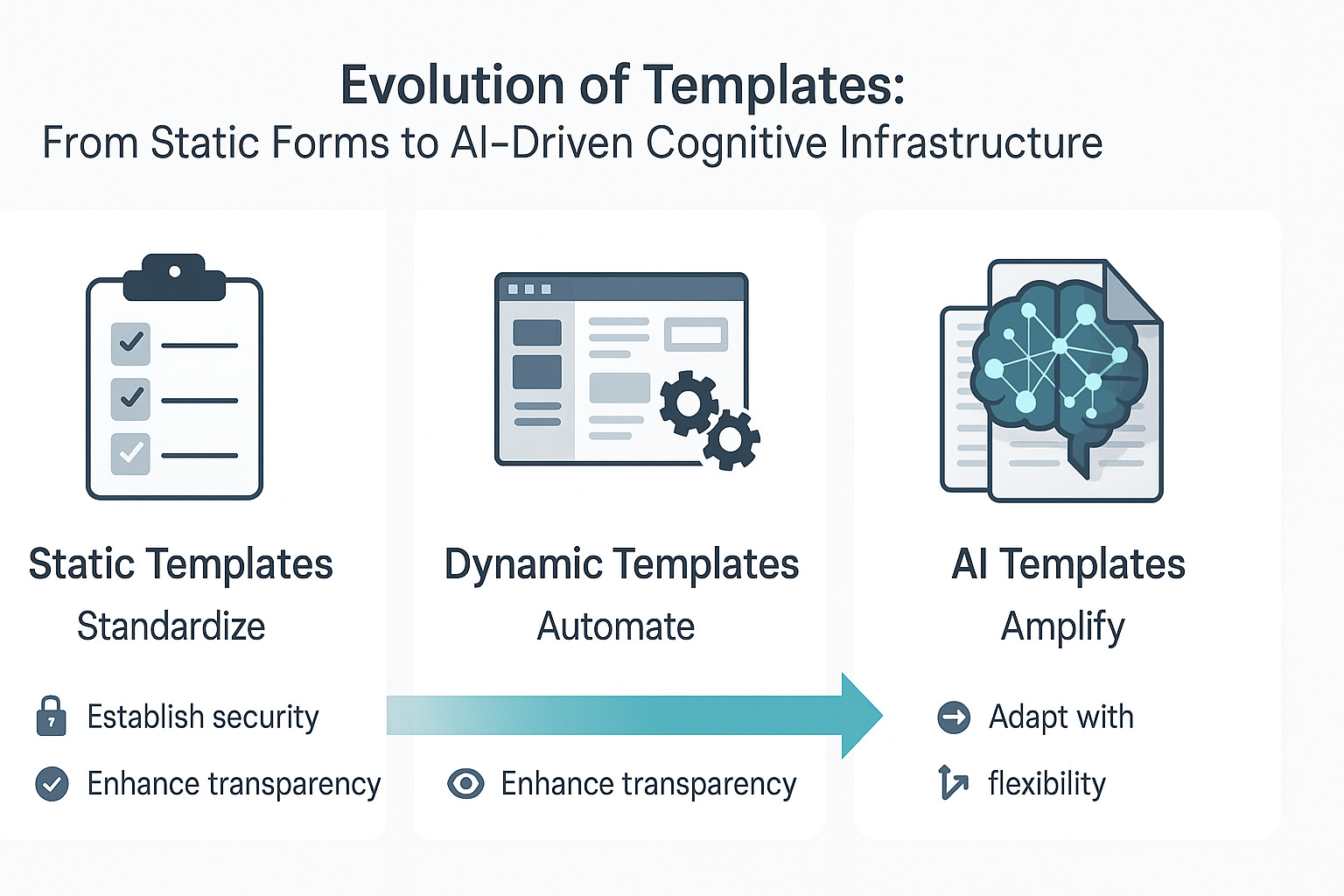
Templates structured formats designed to organize, present, and process information are no longer static tools. They now function as dynamic cognitive amplifiers, workflow engines, and decision aids. This updated paper builds on the original framework by addressing omissions, incorporating applications in modern platforms like JIRA and Trello, and proposing a forward-facing vision of template evolution across AI, business, and domain-specific ecosystems.
1. What Are Templates and Why Do They Matter?
Templates reduce ambiguity, codify best practices, and establish reusable structures for thought and action. They align users across disciplines and increase operational clarity. Their relevance grows as domains demand both standardization and rapid adaptability. Pay attention to cognitive ergonomics templates don’t just accelerate action; they reduce decision fatigue, a critical advantage in time-sensitive or resource-constrained environments. If you want to initiate research into templates design, role of AI etc. here are my notes : Template but there are books on this subject if you search.
2. Domains and Types of Analytical Templates
New Additions:
- Legal and Compliance: Clause libraries, case summary templates, audit trail forms
- Product Management: Product Requirement Documents (PRDs), roadmapping canvases
- Human Resources: Onboarding checklists, behavioral interview matrices
Expanded Typology:
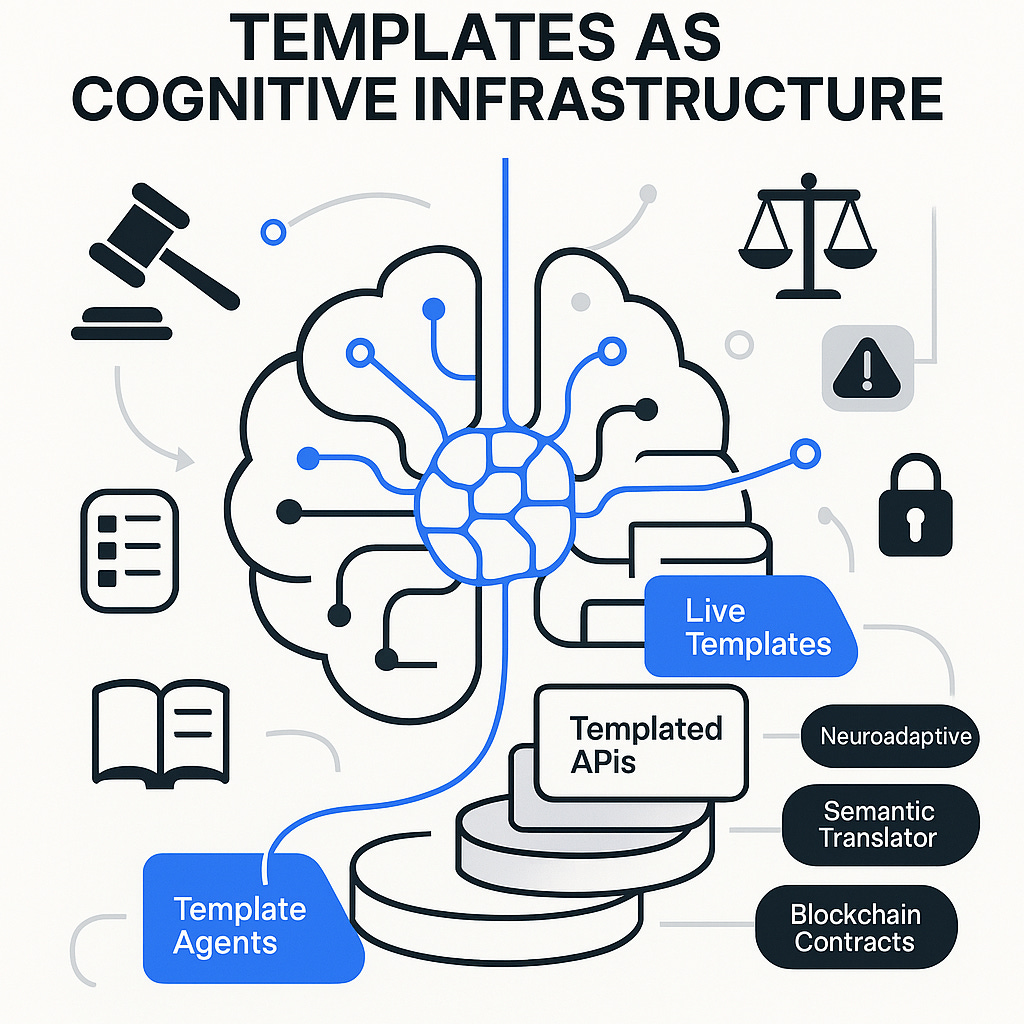
- Template-Agents: Systems that auto-suggest or generate templates based on user input or intent (e.g., Notion AI, Microsoft Loop Copilot)
- Templated APIs: Machine-readable templates in JSON, YAML or BPMN to define system-to-system processes
- Live Templates: Updating in real-time with data changes (used in platforms like Airtable, Coda)
3. Templates as Shared Reference Standards and Domain Vocabulary
Templates support cognitive interoperability—they allow diverse actors to collaborate through common structures and shared mental models. They often encode a field’s epistemology: how knowledge is structured, validated, and transferred.
Critique & Suggestion:
Some templates inadvertently enforce epistemic monoculture (e.g., Western-centric logic in global development tools). Adaptability across cultures and ideologies should be an evolving design concern.
4. The Impact of AI on Templates
AI is turning templates into semi-autonomous, intelligent frameworks. They analyse, learn, and co-create.
Critical Expansion:
- AI-driven templates must be transparent and explainable. In regulated environments, template decisions should produce a clear audit trail.
- Templates integrated with LLMs should avoid hallucination and present a human-in-the-loop interface. See The role of AI in template creation
5. Advantages and Disadvantages of Template Use
Additions to Disadvantages:
- Confirmation Bias Reinforcement: Users may fill in fields to “fit the form,” not the truth.
- Design Inertia: Legacy templates often go unchallenged, fossilizing outdated practices.
6. Limitations of Traditional Templates
Omissions:
- Accessibility Issues: Static templates can exclude neurodivergent or visually impaired users if not thoughtfully designed.
- Multi-language constraints: Many templates assume single-language use, limiting cross-border collaboration.
7. Novel and Emerging Uses of Templates
Additions:
- Template Repositories as Marketplaces: Platforms like Miroverse, Notion Template Gallery, and Coda Packs are turning templates into distributable intellectual capital.
- Cross-functional Integration Templates: Combining task flows from marketing, engineering, and design into unified blueprints.
8. When and How to Use a Template
Updated Best Practices:
- Design for Forkability: Encourage cloning and versioning for different user needs.
- Data Security Awareness: Templates used in sensitive domains should include permission and data-handling rules.
9. Other Considerations
Critical Additions:
- Ethics of Template Design: Who creates the template, and who benefits from its logic? This has political and economic implications in policy and international development.
- Template Debt: Like technical debt, poorly designed templates accumulate complexity over time and become harder to update or replace.
10. Notes on the Use and Practice of Templates
10. 1. Templates as Structured Guidance—not Rigid Rules
- Templates serve as structured guides, offering consistent framing for information gathering, analysis, and communication.
- They should support—not constrain—judgment, creativity, or context-specific adaptation.
- Best practice: Treat templates as starting points, not final forms. Adapt them to your specific domain, audience, or objective.
10. 2. Check Before You Create: Reuse Before Reinventing
- Always confirm if a relevant template already exists before creating a new one. Many organizations have:
- Central template libraries or intranet repositories
- Role-specific or department-specific formats
- Standard compliance templates for audits or regulatory reporting
- Creating redundant or inconsistent templates leads to fragmentation and confusion.
10. 3. Industry-Specific Behaviours and Expectations
Public Sector
- Highly standardized templates often mandated by policy, law, or institutional legacy.
- Pre-approved wording, phrasing, disclaimers, and formatting (e.g., FOIA-compliant report templates).
- Templates often come with reference guides, and changes typically require administrative clearance.
- Branding, structure, and tone are strictly enforced to maintain trust and accountability.
Private Sector
- More flexibility in format, aesthetics, and language, but typically bound by:
- Corporate identity guidelines (logo placement, color schemes, font usage)
- Project management standards (e.g., Agile/Scrum cards, business case templates)
- Internal software ecosystems (e.g., Salesforce, Confluence, Jira)
Nonprofits & Academia
- Emphasis on grant and donor-specific templates, often with rigid funding criteria
- Academic research uses discipline-specific documentation structures (APA, MLA, journal submission formats)
- Open-source culture encourages template sharing and adaptation, with attribution
10. 4. Adaptability and Flexibility in Templates
- Good templates are modular: They allow users to add, remove, or reorder sections as needed.
- Allow optional fields—not every section will apply in every case.
- Include placeholders and tooltips to clarify intent without hardcoding inputs.
- In AI-assisted or dynamic platforms (e.g., Notion, Airtable), consider embedding conditional logic or interactive prompts.
10. 5. Template Use in Software Environments
Configurable Templates
- In platforms like Jira, ClickUp, or Monday.com, templates can be configured per workflow, project type, or team.
- These often include automation triggers, integration rules, and custom fields.
Template Repositories
- Larger organizations maintain central repositories, often version-controlled via tools like SharePoint, Git, or Confluence.
- Repositories should:
- Be easy to search
- Include date/version stamps
- Identify owner or point of contact
Version Control & Governance
- Important for templates in regulated or shared environments:
- Assign version numbers and keep a changelog
- Maintain a template custodian role
- Use review cycles to retire outdated or redundant templates
10. 6. Branding and Distribution
- Templates should align with organizational branding policies:
- Logos, colors, fonts, taglines, footers, and legal disclaimers
- Distributed templates (e.g., to vendors or partners) must ensure:
- Clarity of use
- Ownership
- Intellectual property restrictions, if applicable
10. 7. Key Reminders
- Templates don’t replace thinking—they frame it.
- Always consider audience, context, and purpose.
- A flexible template system promotes:
- Scalability
- Efficiency
- Institutional memory
- Train staff not just in “how to fill a template” but in why the structure exists.
11. Templates in Modern Requirement and Domain Software
A. Jira:
- Built-in and custom templates for user stories, bugs, and epics
- Integration with Confluence for live documents
- Automation rules that act like intelligent template triggers
B. Trello:
- Template cards and boards for project planning, agile workflows, CRM
- Power-ups to add template-based automation (e.g., Butler)
C. ClickUp / Notion / Coda:
- Hierarchical template systems that adapt based on use case
- Dynamic, database-driven templates with filters and views
- Cross-domain embedding (one template can reference or instantiate another)
D. Requirements Software (e.g., Jama Connect, Modern Requirements):
- Requirements traceability templates
- Live-linking between use cases, user stories, test cases
- Compliance-ready formatting and sign-off templates
E. Visual & Collaborative Tools (e.g., Miro, Collaboard):
- Templates for design sprints, strategic planning, systems mapping
- Multi-user interaction and real-time annotation baked in
12. Future of Templates: Directions and Novel Applications
Forecasted Developments:
- Neuroadaptive Templates: Systems that shift visual and information density based on user stress or focus levels (via EEG or biometric inputs).
- Semantic Interoperability Engines: Templates that auto-translate structure and content across platforms (e.g., from Trello to Jira to Excel).
- Template-Aware AI Agents: Capable of recognizing, adapting to, or co-creating based on structured templates (e.g., GPT agents reading and editing PRDs).
- Meta-Templating Platforms: Tools for managing large template libraries with versioning, lineage, usage analytics, and compliance checks.
- Blockchain-Templated Agreements: Smart contract templates that encode enforceable conditions into digital workflows.
Conclusion: Templates as Dynamic Cognitive Infrastructure
Templates are no longer inert forms—they are becoming software-defined scaffolds for reasoning, collaboration, and innovation. Their transformation into intelligent, adaptable, interoperable systems positions them at the heart of modern knowledge work. From corporate systems to public policy labs and AI design studios, templates serve as both map and compass—accelerating not only our work, but our ability to understand and reshape the world.
I will create a template repository in the future for various domains and an AI enabled agent that creates template for different domains and use cases . In Chat GPT try a custom GPT : Business Template Tutor and there are numerous other Custom GPTs
Appendices
Appendices A
Business Case template example
Version: [1.0] | Date: [dd MMM yyyy] | Author: [Insert Name]
1. Document History
1.1 Document Location
Specify the digital storage path or location where this document is maintained.
1.2 Revision History
Revision Date
Version
Summary of Changes
Author
dd MMM yyyy
1.0
Initial Draft
[Name]
1.3 Approvals
Name
Title
Date of Issue
Version
1.4 Distribution
Name
Title
Date of Issue
Version
2. Executive Summary
A concise summary of the Business Case. Highlight key benefits, strategic alignment, and return on investment (ROI).
3. Reasons
Explain why the project is necessary and how it aligns with organizational goals, strategy, or legislation.
4. Business Options
List and analyze possible options. Typical choices include:
- Do nothing (baseline option)
- Do the minimum required
- Do something (preferred option with justification)
5. Expected Benefits
Describe measurable improvements expected as a result of the project. Include specific metrics or KPIs where possible.
6. Expected Dis-benefits
Outline any negative outcomes, even if minor, that could affect stakeholders or performance.
7. Timescales
Provide a high-level summary of the project timeline, including key milestones and the expected benefits realization period.
8. Costs
Summarize capital and operational expenditures, maintenance costs, and funding arrangements. Reference the Project Plan if needed.
9. Investment Appraisal
Compare costs to the total expected benefits and dis-benefits. Include break-even analysis, NPV, or ROI if available. Indicate funding sources and payback period.
10. Major Risks
Summarize the significant risks to delivery, with their likely impact and mitigation or contingency strategies.
Formatting Guidance (not for publishing):
- Use Calibri, Inter, or Lato fonts, 11–12pt size.
- Apply consistent heading levels (e.g., H1 for section titles, H2 for subsections).
- Avoid legacy templates, logos, or colors from third-party brands.
- Use whitespace and bullet points to enhance legibility.
- Ensure all sections are accessible and screen-reader friendly.
- Update with domain, industry or use case specific information
Appendices B: Name and content of example Templates by Domain
Business & Management
· SWOT Analysis Template
Strengths:
Weaknesses:
Opportunities:
Threats:
· Business Model Canvas
Key Partners:
Key Activities:
Value Propositions:
Customer Relationships:
Customer Segments:
Key Resources:
Channels:
Cost Structure:
Revenue Streams:
Science & Research
· Experiment Design Template
Research Question:
Hypothesis:
Variables (Independent/Dependent):
Methodology:
Expected Results:
Ethical Considerations:
Education
· Lesson Plan Template
Learning Objectives:
Materials Needed:
Instructional Procedures:
Assessment Methods:
Differentiation Strategies:
Healthcare
· Clinical Documentation Template
Patient ID:
Symptoms:
Diagnosis:
Treatment Plan:
Follow-Up:
Engineering
· Design Specification Template
Project Title:
Design Objectives:
Functional Requirements:
Non-Functional Requirements:
Constraints:
Testing Procedures:
Public Policy
· Stakeholder Analysis Template
Stakeholder Group:
Interest/Position:
Power/Influence:
Engagement Strategy:
Product Management
· Product Requirements Document (PRD)
Product Overview:
Target Users:
Features:
User Stories:
KPIs and Metrics:
Risks and Assumptions: