🎯 Introduction: Your Design Journey Starts Here
If you’re creating, designing a product, developing a brand, or solving any design challenge, this guide will take you from that initial spark of an idea to the outline of a production-ready project. You don’t need years of design experience just curiosity and the willingness to collaborate with AI as your creative partner. This acts as a precursor prior to the involvement of a Subject Matter Expert
What You’ll Learn:
- How to transform vague ideas into clear design briefs
- Step-by-step design process that professionals use
- How to leverage AI for each phase of your project
- Templates and tools for documentation and production
This was inspired by Can AI Help Revive a Legacy Shoe? From Inspiration to Small-Batch Reality
If this is long read try Short AI design guide
🚀 Phase 1: From Thought to Brief
The Challenge
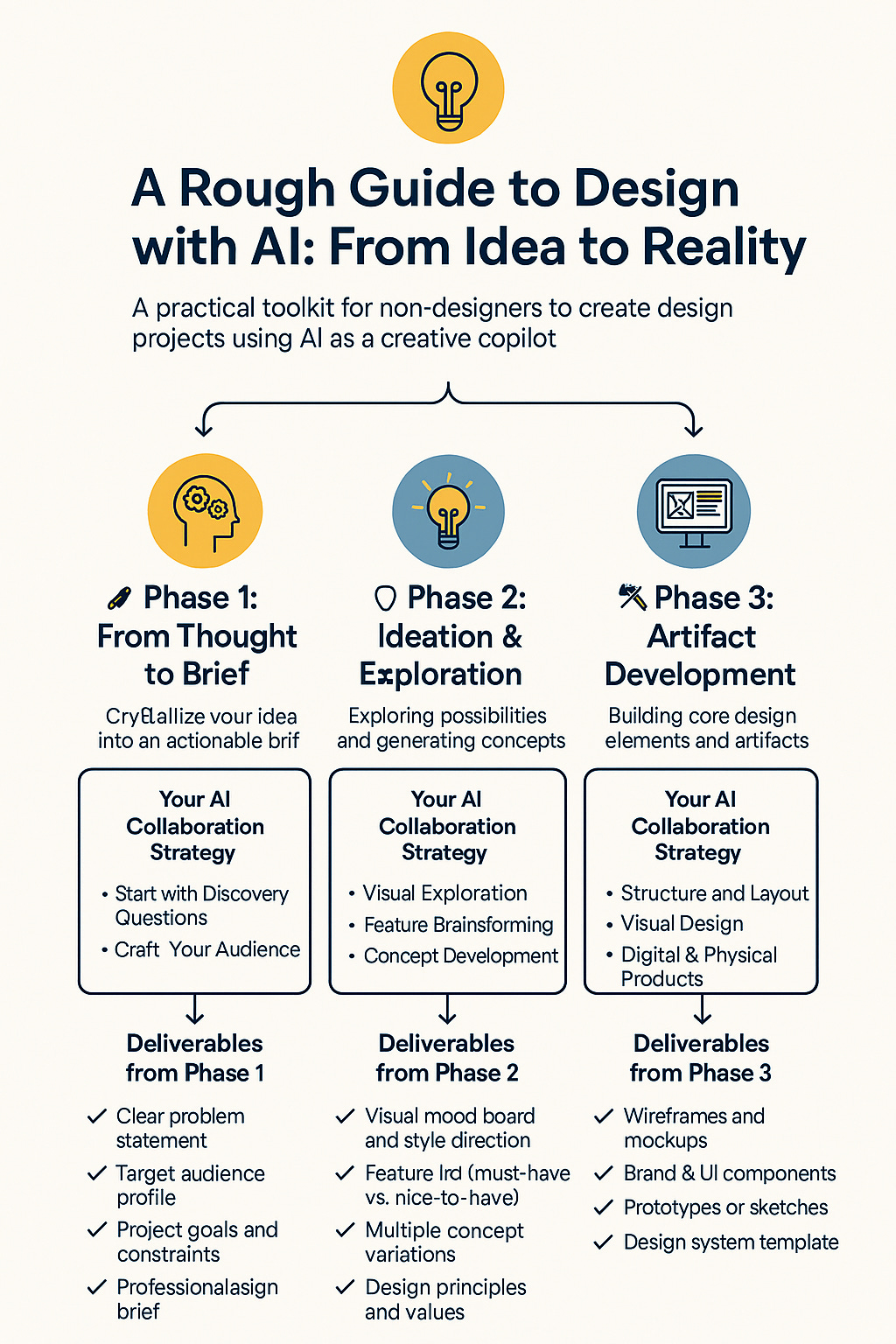
You have an idea, but it’s fuzzy. Maybe it’s “an app that helps people eat better” or “a chair that’s more comfortable for remote work.” The first step is crystallizing this thought into something actionable.
Your AI Collaboration Strategy
🔍 Start with Discovery Questions Ask your AI copilot:
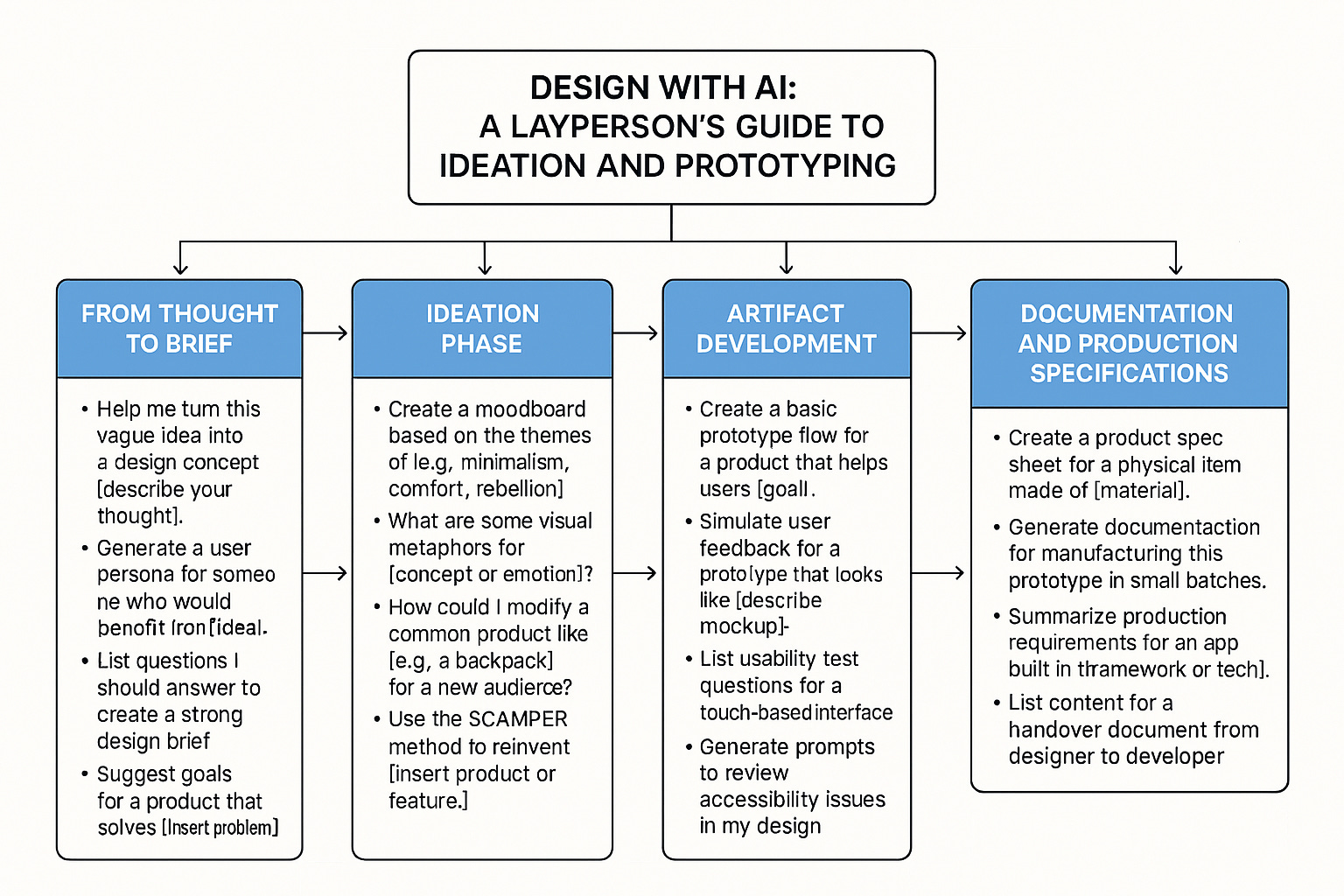
- “Help me explore this idea: [describe your thought]. What questions should I answer to make this clearer?”
- “Generate 5 different problem statements based on this concept: [your idea]”
- “Who would benefit most from a solution like this?”
- Our use ideas capture from explained in Capturing a Stream of Consciousness About an Idea using AI . Basically, it involves capturing thoughts using talk to text using a word processor (window Button+ H for Word) to capture thoughts and asking AI: As a (designer , creative ideas broker ,entrepreneur[ Insert role]), you had an inspired stream of thought on an idea (attached document or paste). You dictated a rough outline and now want to review, analyse. categorize, organize, and rewrite it. Provide suggestions to improve or develop the idea.
Process
You can follow the steps below but if you are impatient look at this document CoCreate and go to the section called AI Prompts and use those prompts for a rough and ready iteration
👥 Define Your Audience
- “Create a detailed user persona for someone who would use [your solution]”
- “What are the daily frustrations this person faces related to [your problem area]?”
- “How does this person currently solve this problem?”
📝 Craft Your Design Brief Use this template with AI assistance:
Project: [Name]
Problem: [What specific problem are you solving?]
Audience: [Who is this for?]
Goals: [What should this achieve?]
Constraints: [Budget, timeline, technical limitations]
Success Metrics: [How will you know it works?]
Sample AI Prompts:
- “Turn this rough idea into a professional design brief: [your concept]”
- “Help me identify the core problem in this idea: [description]”
- “Suggest 3 different target audiences for this concept and their specific needs”
Deliverables from Phase 1
- ✅ Clear problem statement
- ✅ Target audience profile
- ✅ Project goals and constraints
- ✅ Professional design brief
🎨 Phase 2: Ideation & Exploration
The Challenge
Now you need to explore possibilities. What could this look like? What features might it have? What style should it embody?
Your AI Collaboration Strategy
🌈 Visual Exploration
- “Create a mood board for a [product type] that feels [emotions/values]”
- “Show me visual references for [style] design applied to [your domain]”
- “Generate color palettes that convey [brand values/emotions]”
🧠 Feature Brainstorming
- “List 15 features that could help [user persona] with [problem]”
- “Use the SCAMPER method to reimagine [existing solution] for [new context]”
- “What would [your product] look like if it prioritized [specific value]?”
📋 Concept Development
- “Generate 3 different approaches to solving [your problem]”
- “How might [your solution] work differently for [different user types]?”
- “What are some creative metaphors for [your concept]?”
Practical Exercise: The Ideation Worksheet
Fill in with your AI copilot:
My project is about: _________________
The main emotion I want users to feel: _________________
Visual styles that inspire me: _________________
Three different approaches to this problem:
Key features that must be included:
Nice-to-have features:
Deliverables from Phase 2
- ✅ Visual mood board and style direction
- ✅ Feature list (must-have vs. nice-to-have)
- ✅ Multiple concept variations
- ✅ Design principles and values
🛠️ Phase 3: Artifact Development
The Challenge
Time to start building. You’ll create the core elements of your design—wireframes, mockups, brand elements, or product sketches.
Your AI Collaboration Strategy
📐 Structure and Layout
- “Create a wireframe for [product type] that prioritizes [key functions]”
- “Show me different layout options for [specific screen/page/component]”
- “Generate a site map for [website/app] serving [user goals]”
🎨 Visual Design
- “Design a logo that represents [brand values] in [style]”
- “Create a typography system for [project type] that feels [tone]”
- “Generate UI components for [specific interface needs]”
📱 Digital Products
- “Design the main screen for an app that helps users [goal]”
- “Create a user flow for [specific task] in [product type]”
- “Show me how [feature] would work across different screen sizes”
🏗️ Physical Products
- “Sketch a [product] that combines [function 1] and [function 2]”
- “Design a [object] optimized for [specific use case]”
- “Show me different form factors for [product concept]”
Design System Template
Work with AI to create these elements:
Brand Elements:
- Logo and variations
- Color palette (primary, secondary, accent)
- Typography (headings, body, special)
- Iconography style
- Photography direction
Product Elements:
- Core components/features
- Materials and textures
- Dimensions and proportions
- Interaction patterns
- User interface elements
Deliverables from Phase 3
- ✅ Wireframes or structural sketches
- ✅ Visual design elements
- ✅ Brand guidelines (if applicable)
- ✅ Core component library
🧪 Phase 4: Prototype & Test
The Challenge
You need to see how your design works in practice. This phase is about creating testable versions and gathering feedback.
Your AI Collaboration Strategy
🔄 Interactive Prototypes
- “Create a clickable prototype flow for [user journey]”
- “Show me how [feature] would work step-by-step”
- “Design interaction states for [specific component]”
🎭 Simulation and Testing
- “Generate realistic user scenarios for testing [product]”
- “Create a usability test script for [specific functions]”
- “Simulate potential user feedback for [design concept]”
📊 Feedback Analysis
- “List questions to ask users about [specific aspect]”
- “How would different user types interact with [feature]?”
- “What accessibility considerations should I test?”
Testing Framework Template
User Testing Questions:
- First impressions: “What do you think this does?”
- Task completion: “Try to [specific task]”
- Emotional response: “How does this make you feel?”
- Comparison: “How does this compare to [existing solution]?”
- Improvement: “What would make this better?”
Technical Testing Areas:
- Functionality: Does everything work as intended?
- Usability: Can users complete key tasks easily?
- Performance: Does it respond quickly enough?
- Accessibility: Can everyone use it effectively?
- Compatibility: Does it work across different contexts?
Deliverables from Phase 4
- ✅ Interactive prototype or working mockup
- ✅ User testing results and feedback
- ✅ List of identified issues and improvements
- ✅ Refined design based on testing
📄 Phase 5: Documentation & Production Specs
The Challenge
Your design is ready, but others need to understand how to build, manufacture, or implement it. This phase creates the roadmap for bringing your design to life.
Your AI Collaboration Strategy
📋 Production Documentation
- “Create a technical specification document for [product type]”
- “Generate manufacturing requirements for [physical product]”
- “List development requirements for [digital product]”
🔧 Implementation Guidelines
- “Write clear instructions for [specific production process]”
- “Create a handoff document for [team/manufacturer]”
- “Generate quality assurance checklist for [product type]”
📊 Project Management
- “Create a timeline for producing [product] in [quantity]”
- “List potential risks and mitigation strategies”
- “Generate cost estimation factors for [project type]”
Universal Documentation Template
Project Overview
- Project name and description
- Target audience and use cases
- Key features and functionality
- Success metrics and goals
Technical Specifications
- Dimensions and measurements
- Materials and components
- Technical requirements
- Performance standards
Production Requirements
- Manufacturing/development process
- Quality standards
- Testing requirements
- Packaging and delivery
Implementation Timeline
- Phase breakdown
- Key milestones
- Resource requirements
- Risk factors
Deliverables from Phase 5
- ✅ Complete technical specification
- ✅ Production/development guidelines
- ✅ Quality assurance checklist
- ✅ Implementation timeline and budget
🎯 Quick Reference: AI Prompts by Design Type
For Mobile Apps
- “Design a mobile app flow for [user goal]”
- “Create wireframes for [app type] focusing on [key feature]”
- “Generate UI components for [specific functionality]”
For Physical Products
- “Sketch a [product] that solves [specific problem]”
- “Design a [object] using [material] for [use case]”
- “Create technical drawings for [product concept]”
For Branding Projects
- “Design a brand identity for [company/product] that feels [values]”
- “Create a logo that represents [concept] in [style]”
- “Generate brand guidelines for [industry/audience]”
For Web Design
- “Design a landing page for [product/service]”
- “Create a website structure for [organization type]”
- “Generate responsive layouts for [content type]”
🔄 Interactive Workflow: Your Design Journey
Step 1: Idea Capture Start → Define Problem → Identify Audience → Create Brief
Step 2: Explore & Ideate Brief → Generate Concepts → Create Mood Boards → Define Features
Step 3: Design & Build Concepts → Create Wireframes → Design Visuals → Build Components
Step 4: Test & Refine Designs → Create Prototypes → Test with Users → Iterate Based on Feedback
Step 5: Document & Deliver Final Design → Create Specifications → Write Guidelines → Prepare for Production
🎁 Bonus: Advanced AI Collaboration Tips
Getting Better Results from AI
- Be Specific: Instead of “make it look good,” try “create a minimalist design that feels professional and trustworthy”
- Iterate Openly: Ask “show me 5 different approaches” rather than accepting the first suggestion
- Provide Context: Always mention your audience, goals, and constraints
- Ask for Rationale: “Why did you choose this approach?” helps you learn and improve
- Review analyse critiqure and improve the following : Attach file or describe the product , concept, work in progress.
When to Push Back on AI Suggestions
- If the suggestion doesn’t align with your user research
- When accessibility or usability is compromised
- If the design doesn’t serve your specific goals
- When cultural or contextual factors aren’t considered
Building Your Design Vocabulary
As you work with AI, you’ll learn design terminology. Don’t worry about knowing everything upfront—ask AI to explain concepts as you encounter them.
🚀 Ready to Start Your Design Journey?
Remember: Great design isn’t about having all the answers from the beginning. It’s about asking the right questions, testing your assumptions, and iterating based on what you learn. With AI as your creative copilot, you have access to design knowledge and capabilities that can help you create professional-quality work.
Your next step: Pick one idea you’ve been thinking about and start with Phase 1. Ask AI to help you turn that rough concept into a clear design brief. From there, let this guide walk you through each phase.
The initial difference between a professional designer ( education, experience, subject matter expertise, industry knowledge etc) and you is the inital experience of conceptualising your design before engagement and this guide gives you a structured way to gain that insight or experience while creating something meaningful.
Happy designing! 🎨✨