A Strategic Analysis of Form Factor Economics, Market Timing, and AI-Enabled Opportunities
Preamble: When Failure Deserves a Second Look
Innovation rarely follows a linear path. When Microsoft shuttered the Surface Duo line and LG abandoned its dual-screen experiments, the market seemed to deliver a clear verdict: consumers wanted seamless foldables, not hinged dual displays. But this conclusion may have been premature.
The question facing strategists today is not whether dual-screen devices failed, but why they failed and whether the conditions that caused that failure have fundamentally changed. Was it timing? Technology maturity? Software ecosystem readiness? Price positioning? Or simply poor execution on a sound concept?
This analysis argues that the answer is all of the above and that virtually every one of these failure factors has shifted dramatically since 2020-2021. From manufacturing economics to software maturity, from consumer awareness to emerging AI use cases, the landscape has transformed in ways that make dual-screen devices worthy of serious reconsideration.
What follows is a comprehensive strategic analysis of why dual-screen devices may finally have their moment not as premium curiosities, but as a pragmatic bridge category that delivers foldable-class productivity at midrange economics.
1. The Economic Case: Three Taxes Foldables Cannot Escape
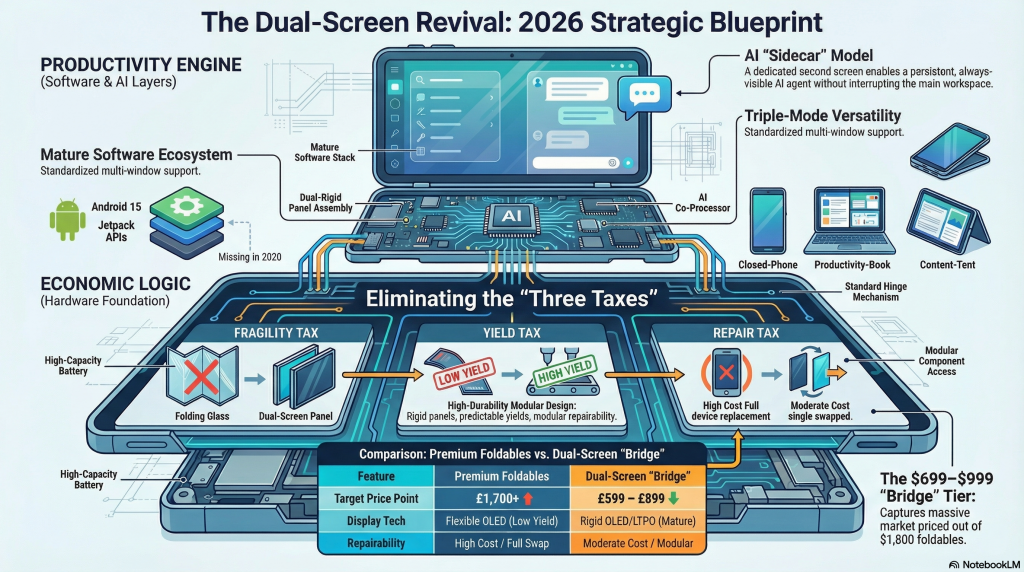
Foldable smartphones remain impressive engineering achievements, but they operate under constraints that dual-screen devices can sidestep entirely. These constraints manifest as three persistent ‘taxes’ on the product:
The Fragility Tax
Flexible OLED panels with ultra-thin glass (UTG) or polymer substrates are inherently more vulnerable than rigid displays. The folding mechanism creates stress points that accumulate over thousands of cycles. Creases develop. Delamination occurs. Protective layers wear through. While manufacturers have improved durability with each generation, the physics of repeatedly flexing a display stack remain unforgiving.
Dual-screen devices eliminate this entirely. Two rigid OLED or LTPO displays behave like conventional smartphone screens—they crack if severely abused, but they do not develop fold-line degradation. Repair is modular: replace one panel rather than an expensive folding assembly.
The Manufacturing Yield Tax
Foldable display production remains a specialist endeavor with lower yields than conventional panels. The supply chain is concentrated among a handful of manufacturers (primarily Samsung Display and BOE). Quality assurance is complex. Every additional layer in the foldable stack UTG, adhesive, touch layer, protective film introduces potential defects.
By contrast, rigid OLED and high-end LCD panels are mature technologies with broad supply chains, competitive pricing, and predictable yields. This translates directly to lower bill-of-materials costs and faster time-to-market.
The Repair Cost Tax
When a foldable display fails, the entire folding assembly typically requires replacement. This is not a user-serviceable repair, and even manufacturer repairs are expensive. Insurance uptake for foldables is high precisely because consumers understand this risk. Dual-screen devices, by using conventional display modules, offer dramatically lower repair costs and greater serviceability.
2. Market Positioning: The Bridge Category Opportunity
In January 2026, premium foldables remain firmly anchored at the luxury tier. The Samsung Galaxy Z Fold 6 launched at approximately £1,799 in the UK. The Google Pixel Fold and OnePlus Open occupy similar price brackets. For the vast majority of global consumers, these devices are aspirational, not accessible.
This creates a strategic gap: millions of consumers who understand the value proposition of a productivity-oriented, multi-screen device but cannot justify premium pricing. Foldables have successfully educated the market about why someone might want more screen real estate in a pocketable form factor. They have demonstrated compelling use cases. But they have not delivered this capability at mass-market price points.
A well-executed dual-screen device targeting the £599-£899 range (or $699-$999 in US markets, ₹45,000-₹70,000 in India) becomes a ‘bridge category‘: offering foldable-class productivity without foldable-class economics. This positioning is not a compromise—it is a deliberate strategy to capture value-conscious power users, students, mobile-first professionals, and creators who have been priced out of the foldable market.
The key insight: you do not need to compete with the Galaxy Z Fold. You need to offer 70-80% of the productivity benefit at 50-60% of the price. For many use cases, discrete screens are not inferior—they are different, and sometimes preferable.
3. The Software Inflection Point: Android Large-Screen Maturity
When the Surface Duo launched in September 2020, Android’s large-screen and multi-window capabilities were rudimentary. App developers had little incentive to optimize for dual-screen form factors because the installed base was negligible. The result was a vicious cycle: poor app experiences led to low adoption, which further discouraged developer investment.
By 2026, this has fundamentally changed:
- Android 12L through Android 15 have introduced comprehensive large-screen optimizations, better multi-window behavior, and improved taskbar functionality
- Jetpack WindowManager provides standardized APIs for detecting hinge positions, screen configurations, and foldable/dual-screen postures
- Major productivity apps (Microsoft 365, Google Workspace, Slack, Zoom) have invested heavily in responsive, multi-window experiences driven by tablet and foldable adoption
- Developer tooling now includes emulators and testing frameworks specifically designed for dual-screen and foldable layouts
Critically, the existence of premium foldables has created an ecosystem that dual-screen devices can now leverage. The work of optimizing apps for side-by-side layouts and multi-window workflows has already been done. Dual-screen manufacturers do not need to bootstrap a new ecosystem—they need to ride the wave created by Samsung, Google, and others investing billions in foldable platforms.
This is the software inflection point that did not exist in 2020. The timing is now favorable in a way it simply was not for the Surface Duo’s initial release.
4. Use Cases Where Dual Screens Excel
A common critique of dual-screen devices is that they sacrifice the ‘seamless canvas’ advantage of true foldables. This critique misses a crucial insight: for many productivity workflows, physical separation is a feature, not a bug.
Persistent Dual-App Workflows
The killer use case is straightforward: keeping two apps persistently visible without switching. Maps and messaging. Calendar and notes. Document editing and email. Trading watchlist and news. In these scenarios, a discrete boundary actually helps reinforce the mental model of ‘two tasks running in parallel’ rather than one blended workspace.
Reference + Workspace Patterns
Students watching lecture videos while taking notes. DIY enthusiasts following repair instructions while operating a camera timer. Language learners viewing subtitles alongside conversation practice. In each case, one screen serves as the ‘reference material’ and the other as the ‘active workspace.’ The physical hinge reinforces this conceptual division.
Creator and Prosumer Workflows
Camera preview alongside professional controls and teleprompter scripts. Video timeline editors with separate preview windows. Livestreamers managing chat moderation on one screen while controlling stream output on the other. These are workflows where discrete screens map naturally to distinct functional zones.
Control Surface Applications
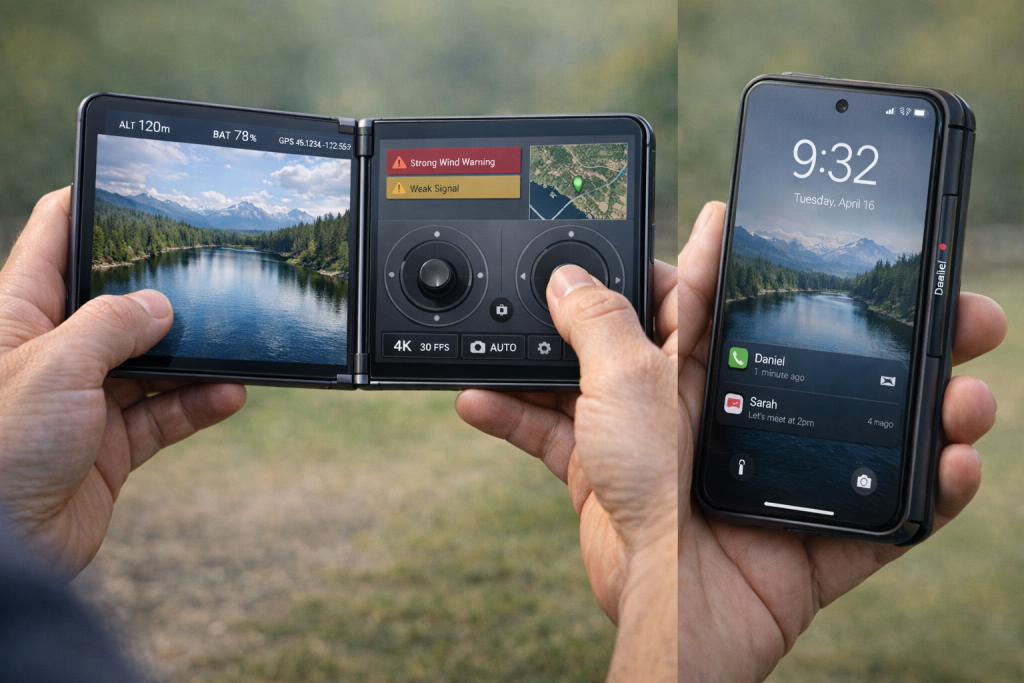
One of the most underexplored opportunities: using one screen as a control surface for external devices. Drone pilots benefit from having live FPV video on one display and telemetry/controls on another. Mobile gamers can dedicate one screen to gameplay and another to Discord or wikis. Emulator enthusiasts can map virtual controls to one screen while displaying the game on the other.
5. The AI Agent Opportunity: Why Dual Screens Change Everything
The emergence of capable AI agents represents a paradigm shift that the original dual-screen pioneers could not have anticipated. Current AI assistants operate primarily through chat interfaces—you toggle to an app, ask a question, receive an answer, then return to your work. This is functional, but it breaks workflow continuity.
Dual-screen devices enable an entirely different interaction model: the ‘co-pilot beside you’ paradigm.
The Sidecar Agent Model
Imagine: your right screen is your workspace (documents, browser, email, camera app). Your left screen is an always-visible AI agent panel that is stateful (remembers your current task), tool-enabled (can take actions across apps with permission), and context-aware (can see what you allow it to see).
This is not ‘a chat window that stays open.’ It is a persistent OS-level collaborator that fundamentally changes how humans interact with mobile computing. Key capabilities include:
- Real-time document review and critique as you type, visible without interrupting your flow
- Meeting companion mode: agenda, live notes, action items, and follow-up drafts running alongside your video call
- Travel planning where the agent holds constraints, tracks prices, builds itineraries, and asks before booking while you browse options
- Creator studio mode: script/teleprompter on one screen, with the agent providing live suggestions, tracking production checklist items, and generating metadata
- Compliance and audit trails for enterprise use: every agent action logged with rollback capability, displayed on the dedicated agent screen
The critical insight: these workflows are cramped and awkward on a single display, even a large one. But on dual screens, they feel natural. The physical separation maps to a clear mental model: one space for you, one space for your AI assistant.
6. Product Design: Learning from Past Failures
The Surface Duo’s greatest weakness was that it failed as a phone when closed. Too wide, awkward to hold, no usable outer display. Users who wanted ‘dual-screen productivity’ still needed it to function as a normal phone 90% of the time.
A viable dual-screen device in 2026 must solve this by designing around three distinct modes:
1. Closed-Phone Mode
A real, normal smartphone experience on a 6.1-6.4 inch outer display. One-handable width. Full camera capability. NFC payments. Fast biometric unlock. This mode must be perfect because it is how most users will interact with the device most of the time.
2. Book Mode
Two interior screens optimized for side-by-side app pairs. System-level ‘app pair’ launcher that remembers your common workflows (Maps + Messages, Docs + Meet, etc.). Intelligent notification routing so messages appear on the screen you designate.
3. Tent/Stand Mode
Hinge engineered to support stable positioning for video calls, media watching, photography, and countertop use. This is where dual-screen devices can actually exceed foldables in versatility.
7. Go-to-Market: Geographic and Segment Strategy
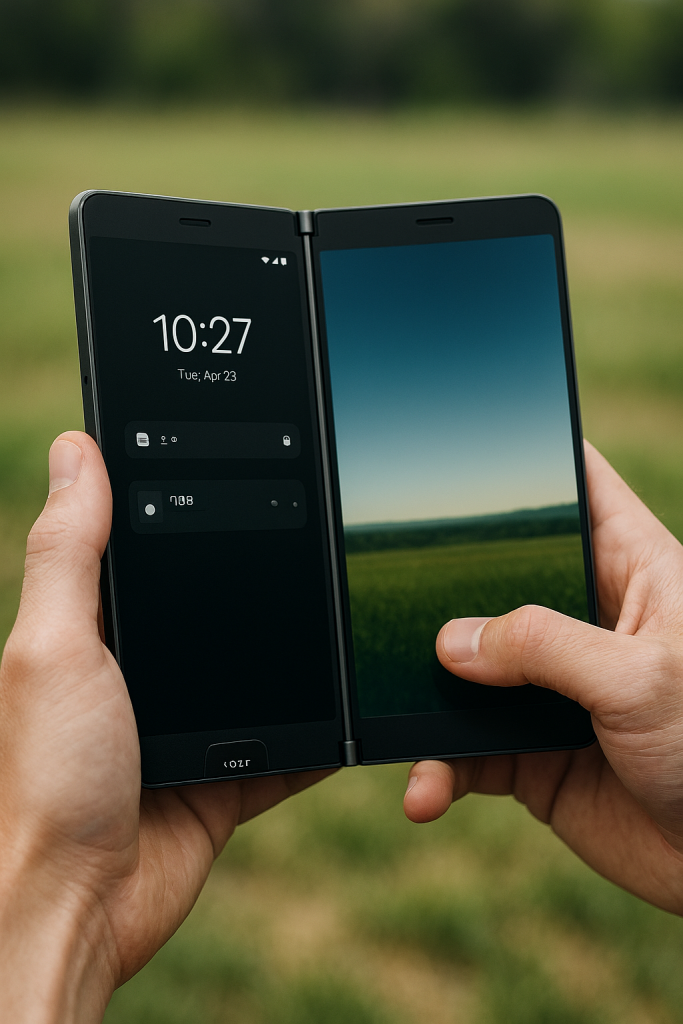
Market entry strategy must balance volume opportunity with execution risk. The ideal approach: start in markets with high Android share, strong midrange appetite, established financing channels, and comfort with novel form factors.
Primary Geographic Targets
- India: Massive volume, price sensitivity, heavy mobile productivity usage, and a thriving creator economy. Financing via EMI is standard. This is the optimal learning market.
- Southeast Asia (Indonesia, Vietnam, Thailand): Young, mobile-first populations with high social media and creator usage. Strong appetite for ‘flagship features at midrange prices.’
- UK and Europe (selective): Enterprise and carrier channels for business productivity positioning. Tougher if you lack brand recognition, but viable for established players.
Primary Buyer Segments
- Value-conscious power users: Want multitasking, refuse to pay foldable prices
- Students: Note-taking plus lecture viewing plus research workflows
- Mobile-first professionals: Sales, field service, healthcare, real estate
- Content creators: Script management, live streaming, editing workflows
8. Risk Analysis and Mitigation Strategies
Any attempt to revive dual-screen devices must acknowledge the failure modes that plagued previous attempts and develop explicit mitigation strategies.
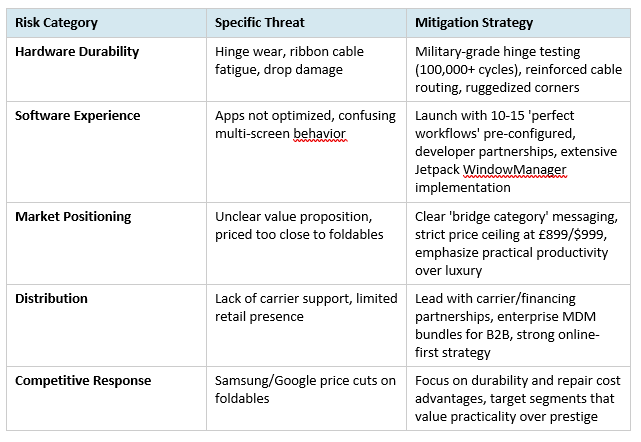
The fundamental risk mitigation strategy is speed: prototype quickly, validate with real users in target markets, iterate based on telemetry, and be prepared to pivot or exit if key hypotheses prove wrong.
9. Strategic Critique: What Could Still Go Wrong
Despite the favorable conditions outlined above, several structural challenges remain that could undermine dual-screen revival attempts.
The ‘Good Enough’ Problem
For many users, split-screen on a large single display (6.7+ inches) is ‘good enough’ for occasional multitasking. They do not feel acute pain that drives them to seek a dual-screen solution. The target market is therefore those who regularly engage in workflows that genuinely benefit from persistent dual-app visibility—a smaller but still substantial segment.
The Brand Perception Challenge
Dual-screen devices carry the baggage of past failures. Microsoft’s exit from the category signals to many consumers that ‘it doesn’t work.’ Overcoming this perception requires either an established brand with consumer trust or a compelling story about why ‘this time is different.’ New entrants face significant skepticism.
The Foldable Price Trajectory
If foldable manufacturing yields improve dramatically and prices drop to £1,200-£1,400 range within 18-24 months, the value gap narrows. Dual-screen devices need to maintain a meaningful price advantage (at least £400-£600 lower) to remain attractive. This puts pressure on BOM optimization.
The Execution Standard
Success requires near-perfect execution across hardware durability, software polish, app partnerships, go-to-market, and support infrastructure. There is little room for ‘version 1.0 issues.’ Early adopters will be unforgiving because they have been burned before.
Conclusion: The Case for Strategic Exploration
The question posed at the outset was whether dual-screen devices deserve reconsideration—not as assured successes, but as viable strategic bets. The analysis above suggests the answer is a qualified yes, contingent on several factors aligning:
- Targeting the £599-£899 price band (or regional equivalents) to create meaningful separation from premium foldables
- Solving the ‘closed-phone mode’ problem that doomed the Surface Duo
- Launching with 10-15 truly polished, pre-configured workflows that demonstrate immediate value
- Leading with markets (India, Southeast Asia) that offer volume learning opportunities and financing infrastructure
- Embracing the AI agent opportunity as a differentiator that foldables have not yet fully exploited
The most compelling argument for revisiting dual-screen devices is not that they will replace foldables, but that they can occupy a distinct category: practical productivity devices for users who value function over form and economics over prestige.
Foldables have educated a global market about why multi-screen mobile computing matters. They have built the software ecosystem. They have demonstrated the use cases. But they remain priced for early adopters and status seekers. Dual-screen devices can capture everyone else—the students, the field professionals, the creators, the value-conscious power users—who want these capabilities at accessible prices.
Will this work? There are no guarantees. But the timing is better, the software is ready, the use cases are proven, and the AI opportunity is emerging. For strategists willing to learn from past failures and execute with discipline, dual-screen devices represent a genuine market opportunity—not a moonshot, but a calculated bet on a bridge category that makes increasing sense in 2026.
The question is not whether dual-screen devices could work. The question is whether anyone is prepared to execute the strategy required to make them work. That is an implementation challenge, not a conceptual one—and implementation challenges are precisely what separate successful ventures from compelling thought experiments.
Proceed / Test / Pause: Test
Recommendation: Develop functional prototype with AI agent sidecar, validate 10 hero workflows with target segments in India and Indonesia via carrier partnerships, establish maximum viable BOM targets, and proceed to limited production only if validation confirms both technical viability and market demand at target price points.
APPENDIX A
The Stylus Advantage: Why Active Pen Integration Transforms Dual-Screen Usability
Executive Summary
Active stylus integration represents a critical but underexplored differentiator for dual-screen devices. While touch interfaces dominate smartphone interaction, the dual-screen form factor creates unique opportunities for pen-based input that single-screen devices cannot match. This appendix examines why stylus support is not merely an accessory feature but a fundamental enabler of productivity workflows that justify the dual-screen premium.
The core argument: dual screens plus active pen creates a ‘digital desk’ interaction model—one surface for reference, one for writing/annotating—that mirrors centuries of analog productivity patterns. This is not innovation for its own sake; it is technology finally catching up to how humans naturally work.
1. The Fundamental Case for Pen Input on Dual Screens
1.1 The Touch Paradox
Touch interfaces excel at consumption and navigation but struggle with precision creation tasks. Your finger is 8-12mm wide; a quality stylus tip is 0.5-1mm. This 10-20x precision advantage matters immensely for:
- Handwritten notes and annotations
- Detailed sketching and diagramming
- Precise editing and markup
- Fine control in creative applications
- Selection and manipulation of small UI elements
On a single-screen device, pen support is valuable but often optional—users can switch between touch and pen on the same surface. On dual screens, however, the pen enables entirely new workflows where one hand holds the pen for writing while the other navigates on the second screen, or where precise annotation occurs on one display while reference material remains visible on the other.
1.2 The Dual-Screen Pen Multiplier Effect
Stylus utility does not merely add to dual-screen capability—it multiplies it. The combination creates three distinct interaction paradigms:
- Reference + Annotation: Display document/image/video on one screen, annotate on the other with pen
- Source + Creation: View reference material on one screen, handwrite notes/sketches on the other
- Control + Canvas: Use pen for precise input on one screen while the other displays outcomes/previews
2. High-Value Use Cases Enabled by Dual-Screen + Pen
2.1 Education and Academic Workflows
Active Learning Mode
- Left screen: Lecture video, PDF textbook, or course materials
- Right screen: Digital notebook for handwritten notes with pen
- Benefit: Natural note-taking flow without pausing video or switching apps. Research shows handwriting improves retention compared to typing.
Document Annotation and Markup
- Left screen: Original document (assignment, research paper, thesis)
- Right screen: Annotation layer with pen for margin notes, corrections, diagrams
- Benefit: Preserve original document integrity while creating detailed feedback. Essential for peer review, self-editing, and collaborative work.
Mathematics and STEM Problem Solving
- Left screen: Problem set, formula reference, graphing calculator
- Right screen: Handwritten solution work with pen (equations, diagrams, calculations)
- Benefit: Mathematics is fundamentally pen-based. Typing equations is slow and breaks flow. Dual-screen + pen enables natural STEM workflows.
Language Learning with Writing Practice
- Left screen: Vocabulary flashcards, character demonstrations (Chinese/Japanese/Arabic)
- Right screen: Handwriting practice with pen, stroke-order verification
- Benefit: Character-based languages require stroke practice. Pen input with pressure sensitivity and tilt detection provides authentic writing feedback.
2.2 Professional and Enterprise Workflows
Legal and Compliance Document Review
- Left screen: Contract, regulatory filing, compliance document
- Right screen: Annotation layer with pen for redlining, clause comments, legal notes
- Benefit: Legal markup requires precision. Pen-based redlining is faster and more natural than keyboard-based commenting. Audit trails remain intact.
Field Service and Technical Documentation
- Left screen: Service manual, wiring diagram, AR overlay of equipment
- Right screen: Pen-based work order completion, diagram annotation, signature capture
- Benefit: Field technicians work with gloved hands, dirty environments, or while holding tools. Pen provides reliable input when touch is compromised. Digital signatures avoid paperwork.
Medical and Healthcare Documentation
- Left screen: Patient record, imaging results, lab values
- Right screen: Handwritten clinical notes, anatomical sketches, prescription writing
- Benefit: Physicians think in handwriting. Clinical notes are faster via pen than typing. Anatomical diagrams communicate more effectively than text descriptions.
Design Review and Creative Collaboration
- Left screen: Design comp, architectural drawing, product mockup
- Right screen: Pen-based markup layer for feedback, quick sketches, dimensional callouts
- Benefit: Design feedback requires visual communication. Sketching revisions is faster than describing them verbally or in text.
Sales and Real Estate Presentations
- Left screen: Property listing, product catalog, pricing sheet (client-facing)
- Right screen: Pen-based notes, calculations, signature capture (agent-facing)
- Benefit: One screen faces the client (clean presentation), the other faces the agent (working notes). Pen enables natural calculations and signature capture without interrupting client interaction.
2.3 Creative and Content Production
Storyboarding and Script Development
- Left screen: Script or narrative timeline
- Right screen: Pen-based storyboard sketches, scene diagrams, shot composition notes
- Benefit: Visual planning is pen-native. Directors and creators think in sketches. Dual-screen enables simultaneous script reference and visual development.
Photo and Video Editing with Precision Masking
- Left screen: Full image/video preview
- Right screen: Pen-based masking, rotoscoping, precision selection tools
- Benefit: Masking requires pixel-level precision. Pen with pressure sensitivity enables natural feathering and edge refinement impossible with touch or mouse.
Digital Art and Illustration
- Left screen: Reference images, color palettes, layer management
- Right screen: Pen-based drawing canvas with tilt and pressure sensitivity
- Benefit: Artists need reference material constantly visible. Dual-screen eliminates the need to minimize/restore reference windows. Pen with 4096+ pressure levels enables professional-grade brushwork.
Music Notation and Composition
- Left screen: Audio playback, MIDI keyboard, instrument reference
- Right screen: Pen-based notation writing, chord charts, lyric annotation
- Benefit: Music notation is inherently graphical. Pen-based entry is faster and more intuitive than keyboard shortcuts for note placement, dynamics, articulations.
2.4 Personal Productivity and Workflow Management
Meeting Notes with Real-Time Agenda Tracking
- Left screen: Video call, shared presentation, or meeting agenda
- Right screen: Handwritten notes with pen, action item capture
- Benefit: Handwriting during meetings appears more engaged than typing. Notes can be converted to text via OCR afterward. Pen allows quick diagrams and relationship mapping.
Task and Project Planning with Visual Mapping
- Left screen: Project management tool, calendar, task list
- Right screen: Pen-based mind maps, workflow diagrams, dependency charts
- Benefit: Strategic thinking is often non-linear. Pen-based mapping tools (mind maps, flowcharts, swimlanes) externalize thought processes better than text lists.
Personal Knowledge Management and Zettelkasten
- Left screen: Source material (articles, books, research)
- Right screen: Pen-based note cards, connection mapping, synthesis writing
- Benefit: Knowledge work requires synthesis. Handwritten notes improve comprehension and memory. Dual-screen enables active reading with immediate capture.
3. Technical Requirements for Effective Pen Integration
3.1 Active Pen Technology Stack
Not all styluses are created equal. Effective dual-screen pen integration requires active pen technology (not capacitive ‘dumb’ styluses) with the following specifications:
- Pressure sensitivity: Minimum 2048 levels, ideally 4096+ for professional creative work
- Tilt detection: For natural shading and brush angle simulation
- Palm rejection: Robust hand-resting detection to prevent accidental input
- Low latency: Sub-20ms input lag for natural writing feel (ideally <10ms)
- Hover detection: Pen position sensing before contact for UI previews and cursor positioning
- Barrel buttons: Programmable buttons for eraser, right-click, or custom functions
- Battery-free operation: EMR (Electromagnetic Resonance) or AES (Active Electrostatic) technology that powers the pen from the digitizer
Established technologies include Wacom EMR (used in Samsung Galaxy Note series), Microsoft Pen Protocol (Surface devices), and USI 2.0 (Universal Stylus Initiative). For cost-sensitive implementations, Wacom EMR offers the best balance of capability, ecosystem support, and manufacturing maturity.
3.2 Software and Operating System Support
Hardware capability means little without software that leverages it. Android has made significant strides in stylus support:
- Android 12+ includes improved stylus APIs with pressure, tilt, and hover data
- System-level handwriting recognition via Google Handwriting Input or manufacturer-specific solutions
- Screen-off memo capabilities (write notes without unlocking device)
- Air gestures and hover interactions for UI navigation
- Smart select and screenshot markup tools
For dual-screen devices, additional software primitives become essential:
- Cross-screen pen awareness (pen works seamlessly across both displays)
- Screen-specific pen profiles (different pen behavior per screen, e.g., writing on right, navigation on left)
- Annotation overlay system that works across both screens
- Pen-to-screen assignment modes (dedicate one screen to pen-only input while other remains touch-enabled)
3.3 Application Ecosystem Requirements
Pen integration is only as valuable as the applications that support it. A dual-screen + pen device requires a curated set of pen-optimized applications across categories:
Note-Taking and Knowledge Management
- OneNote, Evernote, Notion (handwriting input)
- Squid, Nebo, GoodNotes (dedicated handwriting apps)
- Obsidian, Roam Research (knowledge graphs with pen support)
Document Annotation and PDF Markup
- Adobe Acrobat, Xodo PDF Reader
- Foxit PDF, PDF Expert
- LiquidText (active reading with annotation)
Creative and Design Tools
- Infinite Painter, Autodesk SketchBook, Concepts
- Adobe Fresco, Clip Studio Paint
- Vectornator, Affinity Designer (vector illustration)
Diagramming and Visual Thinking
- MindMeister, SimpleMind (mind mapping)
- LucidChart, Draw.io (flowcharts)
- Miro, Mural (collaborative whiteboarding)
4. Competitive Positioning: The Pen as Differentiator
4.1 Current Market Landscape
As of January 2026, the stylus-enabled smartphone market has evolved significantly:
- Samsung Galaxy S Ultra series: Active pen (S Pen) integration in candy-bar form factor, premium pricing (£1,200+)
- Samsung Galaxy Z Fold series: S Pen support on foldable, ultra-premium (£1,800+)
- Budget stylus phones (Moto G Stylus, etc.): Capacitive styluses, limited pressure sensitivity, midrange pricing
- Tablets with pen: iPad Pro + Apple Pencil, Samsung Galaxy Tab S + S Pen (not pocketable)
The opportunity: No device currently offers dual-screen + active pen in the £600-£900 range. This is the whitespace. A dual-screen device with Wacom EMR or equivalent technology can deliver pen-enabled productivity workflows that compete with tablets and premium phones while maintaining pocketability and smartphone functionality.
4.2 Value Proposition Matrix
| Form Factor | Pen Quality | Price Range | Productivity Advantage |
| Premium Single-Screen + Pen | Excellent (4096 pressure) | £1,200+ | Single-app pen use, requires app switching |
| Premium Foldable + Pen | Excellent (4096 pressure) | £1,800+ | Large canvas but fragile, expensive repair |
| Budget Stylus Phone | Poor (capacitive, no pressure) | £200-£400 | Limited precision, basic note-taking only |
| Dual-Screen + Active Pen | Excellent (4096 pressure) | £600-£900 | Reference + annotation workflows, durable rigid screens |
The highlighted row represents the strategic whitespace: professional-grade pen input combined with dual-screen productivity at a price point that captures value-conscious segments excluded from premium options.
5. Economic Analysis: BOM Impact and Pricing Strategy
5.1 Digitizer Technology Cost Structure
Adding active pen support increases bill-of-materials costs, but the premium is manageable:
- Wacom EMR digitizer layer per screen: ~$12-18 at volume (established technology, mature supply chain)
- Active pen unit cost: ~$8-15 for basic EMR pen, $20-30 for premium with buttons and eraser tip
- Software licensing and integration: $3-5 per device for pen-aware OS features
- Total added BOM for dual-screen pen support: ~$35-55 per device
At a target retail price of £699-£899, this represents approximately 4-6% of total BOM—significant but justified by the productivity differentiation it enables. Critically, this cost is fixed regardless of how intensively the user employs the pen, making it an attractive bundle for target segments who will use it frequently.
5.2 Market Willingness to Pay
Consumer research from premium pen-enabled devices (Samsung Galaxy Note series historically commanded 10-15% price premium over equivalent non-pen models) suggests pen support is valued when:
- It is marketed as integral to device identity, not an afterthought accessory
- Use cases are demonstrated concretely (not abstract ‘you could use a pen’)
- Pen is included in box (not sold separately)
- Software showcases pen capabilities immediately upon unboxing
For a dual-screen + pen device positioned at £699-£899, the pen becomes the explainer for ‘why dual screens matter.’ It converts the form factor from novelty to necessity for students, professionals, and creators who immediately recognize the value of reference-plus-annotation workflows.
5.3 Pen as Customer Acquisition and Retention Tool
Beyond direct BOM cost, pen integration provides strategic marketing and retention benefits:
- Differentiation in crowded smartphone market (fewer than 5% of Android phones include active pen)
- Higher customer lifetime value (pen users develop workflows that create switching costs)
- Premium positioning without premium pricing (pen signals ‘pro device’ even at midrange price)
- Ecosystem lock-in through handwritten notes corpus (users reluctant to abandon handwriting archives)
- Word-of-mouth marketing from satisfied niche users (students, artists, professionals become evangelists)
6. Implementation Roadmap: Pen-First Product Strategy
6.1 Hardware Development Priorities
To successfully integrate pen support into a dual-screen device, the hardware development sequence should prioritize:
- Digitizer selection and validation: Partner with Wacom or equivalent provider early. Test latency and accuracy across both screens in various hinge positions.
- Pen silo design: Include pen storage in device chassis (Samsung Galaxy Note model) or provide secure magnetic attachment. Pens that must be carried separately get lost.
- Palm rejection tuning: Dual-screen complicates palm rejection (hand may rest on one screen while writing on the other). Requires extensive real-world testing.
- Screen coating optimization: Pen tip feel matters. Work with glass suppliers to achieve paper-like friction without compromising durability.
- Accessory ecosystem: Design pen clip, replacement tips, and optional ergonomic grip extensions for extended writing sessions.
6.2 Software Development Priorities
Hardware means nothing without software that showcases it. Day-one software must include:
- Pen-aware launcher: On device boot, tutorial demonstrates key pen workflows (screen capture + annotation, split-screen note-taking, handwriting recognition).
- Native note-taking app: Fast-launch from screen-off, handwriting-to-text OCR, shape recognition, audio recording synced to handwritten notes.
- Cross-screen annotation overlay: Global annotation mode that lets users mark up any app on either screen (essential for PDF review, image markup, feedback workflows).
- Pen gesture shortcuts: Air gestures and hover interactions to navigate UI, switch apps, or trigger pen-specific features without touching screen.
- Handwriting input everywhere: System-wide handwriting recognition in any text field, with inline conversion to typed text.
- App pair templates featuring pen: Pre-configured workflows like ‘PDF + Notes,’ ‘Video + Sketching,’ ‘Browser + Annotation’ that demonstrate pen value immediately.
6.3 Go-to-Market: Pen as Hero Feature
Marketing strategy must position the pen not as an accessory but as the reason dual screens matter:
- Tagline: ‘Your digital desk. Two screens. One pen. Infinite productivity.’
- Campaign visuals: Show pen in every hero image. Demonstrate reference + annotation in action, not just hardware beauty shots.
- Target messaging by segment:
- – Students: ‘Lecture on one screen, notes on the other. Never miss a detail.’
- – Professionals: ‘Review contracts while annotating. Close deals faster.’
- – Creators: ‘Reference on the left. Create on the right. Ship better work.’
- Retail demonstrations: Train staff to demo pen workflows, not just open/close the hinge. Provide demo scenarios (mark up a PDF, sketch over a photo, convert handwriting to text).
- Influencer partnerships: Partner with note-taking YouTubers, digital artists, productivity bloggers who can demonstrate real workflows (not just unboxing).
7. Conclusion: Why Pen Integration is Not Optional
Active pen support transforms dual-screen devices from ‘interesting form factor experiment’ to ‘indispensable productivity tool’ for key target segments. The economic cost (~£35-55 BOM increase) is modest compared to the strategic value: differentiation, higher perceived value, workflow lock-in, and target segment resonance.
Critically, the pen solves the fundamental dual-screen question: ‘Why would I want this instead of a large single screen?’ The answer becomes concrete: reference on one screen, precise pen-based annotation/creation on the other. This workflow is cramped on a single display and fragile/expensive on a foldable. Dual-screen + pen occupies a distinct position.
Implementation risks exist: palm rejection complexity, pen silo design challenges, software optimization requirements, and application ecosystem coordination. But these are execution challenges, not conceptual flaws. They are solvable with proper engineering investment and partner collaboration.
The market evidence supports pen integration:
- Samsung Galaxy Note series commanded sustained price premiums and fierce user loyalty for over a decade
- Apple Pencil attachment rates for iPad Pro exceed 50% in education and professional segments
- Wacom tablet market remains robust despite smartphone dominance, indicating persistent demand for precision input
- Handwriting-to-text applications (GoodNotes, Notability, Nebo) see sustained growth, proving pen workflows are not legacy behaviors
For a dual-screen device targeting students, mobile professionals, and creators at £600-£900 pricing, active pen integration is not a nice-to-have feature—it is the feature that justifies the form factor’s existence. Without it, the device is ‘two screens looking for a problem.’ With it, the device becomes ‘the most natural way to work with reference material and creation tools simultaneously.’
The recommendation is unambiguous: any serious dual-screen product strategy must include active pen support from day one. Attempting to add it later (post-launch v2) sacrifices the critical window where early adopters form opinions and workflows. Get it right initially, or risk joining the Surface Duo in the museum of ‘interesting ideas that didn’t quite work.’
• • •