Preamble
You can start from a simple idea, a tiny display that shows one note, then sleeps, with a target bill of materials of £20 to £40. The base concept already offers three paths, from an old Android phone you already own, to an ESP32C3 e-paper build, to ultra-reuse options like e-readers or ESL tags. Power from the wall for phones, use deep sleep for e-paper, and push new notes
This piece also extends that foundation (see appendices) . You will turn those same parts into a modular security and sensing layer for the home. Old phones become cameras, mics, and presence beacons. E-paper tiles become silent alert boards on the fridge or hallway. A small rules engine ties it together. Everything runs at the edge unless you choose the cloud.
This is the lazy afternoon Hack if you consider using AI to create Apps to control this.
Cheap “Post-Electronic Post-it” Concept
Target price per unit: £20 to £40, using reused parts where possible.
What you are building
A tiny, persistent, low-power display that shows one note to many at a time. It updates from your phone or laptop, then sleeps. The screen stays readable with zero power between updates. Optinal control from phone . Inspiration: This Hacker made a ‘Paperless Post-It’ using an E-paper display and $40 hardware
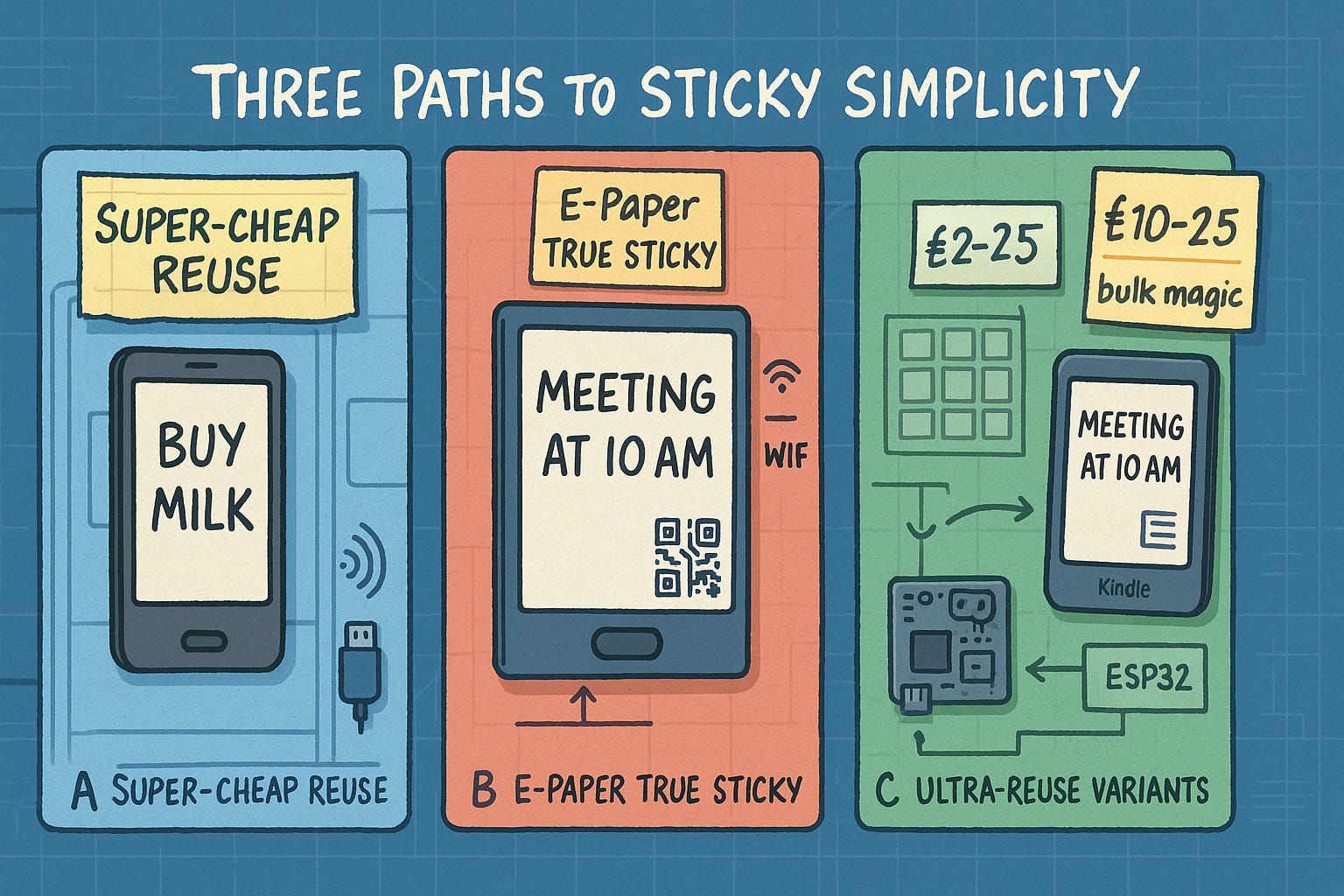
Three build paths:
A. Super-cheap reuse: old Android phone as the “sticky”
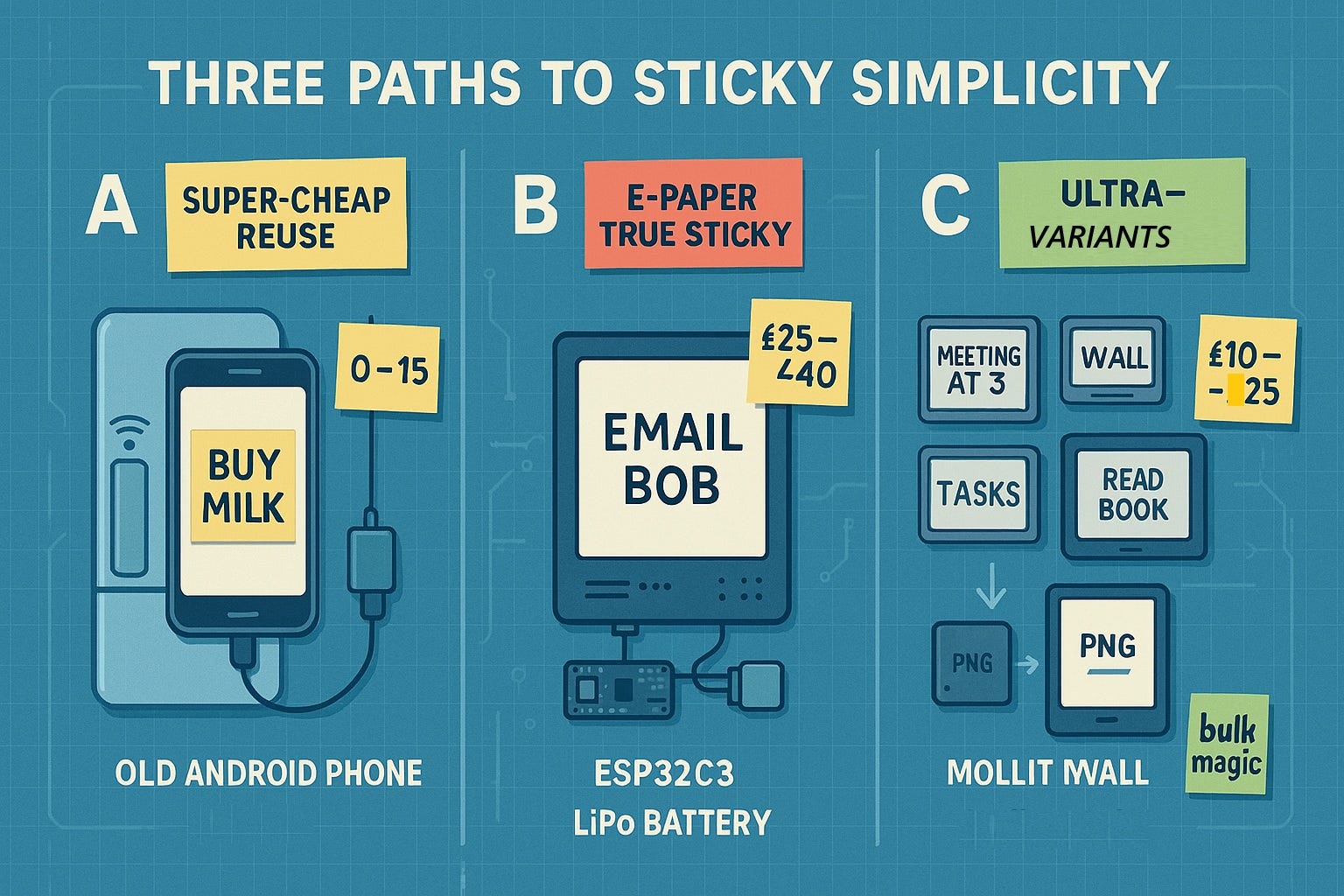
Use what you already have. Total new spend can be £0 to £15.
Parts
- Old Android phone, any 2016 or newer.
- USB wall adapter or power bank.
- Magnetic plate or 3M Command strips.
- Optional: NFC tag to trigger your “Send note” shortcut.
Setup
- Install a kiosk app to keep a single web page on screen.
- Host a minimal web page that renders text large and high contrast.
- Use Tasker or a Shortcut to POST your note to that page.
- Keep brightness low and use a black background with white text.
- Power it from the wall, or use a big power bank.
Why this works
- Zero soldering.
- Basically free if you have a spare phone.
- Always-on is power hungry compared to e-paper, so plan for mains power.
Estimated cost if buying used phone + bits: £10 to £25.
B. E-paper “true sticky” with ESP32C3
This hits the sweet spot on cost, power, and simplicity. Total: £25 to £40.
Bill of materials
- 2.9 inch e-paper module, 296×128 or 296×240, SPI. £16 to £22.
- ESP32-C3 board, e.g. Seeed XIAO ESP32C3 or similar. £5 to £8.
- LiPo cell 500 to 1000 mAh. £3 to £6.
- TP4056 LiPo charger module with protection. £0.50 to £1.
- Slide switch, JST-PH connector, a few wires. £1.
- Back plate: magnetic sheet or 3D printed case. £0 to £2.
Wiring
- E-paper SPI to ESP32C3: CLK to GPIO8, MOSI to GPIO10, CS to GPIO7, DC to GPIO6, RST to GPIO5, BUSY to GPIO4.
Adjust pins to match your board’s SPI. - LiPo to TP4056 to ESP32C3 5 V or 3V3 input per board docs.
- Power switch inline on battery positive.
Firmware stack
- Arduino core for ESP32C3.
- Display driver: GxEPD2 or vendor driver.
- Transport: choose one.
- BLE UART for simple phone push.
- Wi-Fi with a tiny HTTP endpoint.
- Wi-Fi MQTT if you already use Home Assistant.
- Deep sleep between updates. Wake on button or timed wake.
Update flow
- Phone app or shortcut sends JSON like {“title”:”Groceries”,”body”:”milk, eggs, rice”,”qr”:”optional-url”}.
- Device wakes, draws text and optional QR, then sleeps.
Power budget, realistic
- Assume 20 refreshes per day. Active 5 s at about 120 mA MCU plus 30 mA panel. Sleep 50 µA.
- Daily use ≈ 5.37 mAh. With a 500 mAh cell you get about 93 days. With 1000 mAh, about 6 months.
- If you update 5 times per day, expect more than 9 months on 500 mAh.
Enclosure and mounting
- 3D print a two-part case, or laser-cut acrylic layers.
- Reuse magnets from an old hard drive, or use magnetic sheet.
- Add a paper label recess for a hand-written heading if you want hybrid use.
UX
- Short press: cycle font size.
- Long press: force refresh from cache.
- Optional LED: blink once when a new note arrives.
- Optional e-ink icon row: battery, Wi-Fi, last updated time.
Security
- BLE pairing required before accepting notes.
- For Wi-Fi, use a short-lived auth token included in the POST body.
- Optional: accept updates only from your LAN.
C. Ultra-reuse variants
Old e-reader as a wall note
- Buy a used Kindle or Kobo for £10 to £25.
- Show a PNG that your phone generates and syncs over USB or Wi-Fi.
- Update a few times per day. Battery lasts weeks.
Hacked supermarket ESL tags
- Used 2.13 inch e-paper shelf labels cost £3 to £6 each in bulk.
- Use an ESP32 “gateway” to push images to many tags.
- Great for a wall grid of notes under £40 total for gateway plus a few tags.
- Best for tinkerers who like RF firmware.
What to build first
Minimal viable build, e-paper
- Flash the ESP32C3 with Arduino.
- Wire the e-paper and run the driver’s “Hello” example.
- Add a simple HTTP server with one endpoint /note.
- On POST, render title, body, and a small QR of a link.
- Deep sleep for 15 minutes, or sleep immediately if a button is pressed.
Phone shortcuts
- iOS Shortcut or Android Intent that sends text to your device IP.
- Optional: add a share extension so any app can “Share to Sticky”.
Note layout
- Top: bold title.
- Body: wrap text, 32 to 40 characters per line.
- Footer: last update time, tiny battery icon.
- Optional QR: bottom right for long URLs or checklists.
Firmware, in short pseudocode
setup() {
if (firstBoot) startConfigAP(); // captive portal to set Wi-Fi or choose BLE
connectNetworkOrBLE();
initEPaper();
drawBootScreen();
goDeepSleep();
}
onHTTPPost(“/note”) {
Note n = parseJSON();
drawNote(n);
saveToRTCmem(n);
respondOK();
goDeepSleep();
}
onButton() {
Note n = loadFromRTCmem();
drawNote(n);
goDeepSleep();
}
Serverless options
- No server needed with BLE UART. Your shortcut writes the JSON string to the device.
- If using Wi-Fi, the device itself is the server. Static IP or mDNS name like posty.local.
Cost check
- ESP32C3 £6, e-paper £18, LiPo £4, charger £1, small parts £2.
- Total typical: £31.
- Using a combined dev board that bundles ESP32 and e-paper can land at £20 to £35.
Build steps you can follow this weekend
- Order parts for the e-paper build.
- Print or cut a simple backplate, add two magnets.
- Flash display demo, confirm crisp text.
- Add HTTP or BLE input.
- Tune fonts for 2 to 3 meters readability.
- Mount on fridge or monitor.
- Create phone shortcut “Send to Sticky”.
- Live with it for a week. Track how often you update to size the battery.
Risks and how to handle them
- Ghosting on e-paper. Use a full refresh once per day.
- Wi-Fi dropouts. Keep a 1-deep cache and retry on next wake.
- Bright rooms. Prefer black text on white background, largest font that fits.
- Parts variance. Test the driver example for your exact panel controller before enclosure assembly.
Stretch ideas
- Solar trickle charge from a £3 garden light panel with a proper LiPo charge controller.
- Tile six small 1.54 inch panels for a kanban view.
- NFC tap to push a note template, no pairing.
- Home Assistant integration to auto-pin your next calendar item each morning.
Conclusion
You can turn the note display into a quiet, useful home sensing layer with parts you already have. Old phones become smart eyes and ears. E-paper tiles become durable alert boards that sip power. Use local processing and LAN-only transport to keep your data private. Reuse the base device patterns for HTTP endpoints, deep sleep, timed wake, and secure pairing, and you get a cohesive system for pennies on the pound.
Appendices
Appendix A. Novel extensions to the “Post-Electronic Post-it” with AI
Goal. Keep the low cost and low power idea, add useful intelligence without bloat.
- Smart capture to smart note.
- Phone shortcut parses your message for tasks, dates, and links.
- Output a clean note JSON with title, body, optional QR. The base device already renders this shape and sleeps, so you keep the same interface.
- Ambient briefings.
- Each morning, the device wakes, fetches a single summary from your calendar and top reminders, draws it once, then sleeps. The firmware already supports timed wake and deep sleep.
- On-device mini classifiers.
- Tiny models classify incoming messages: alert, reminder, or archive.
- Only “alert” messages push to the display immediately, others queue for the next wake.
- Contextual QR.
- If body text includes a long URL or checklist, include a QR in the corner. The base layout already anticipates this.
- LAN-only security.
- Use short-lived tokens per POST, or BLE pairing for push, both already suggested for secure updates.
Why this helps. You keep single-purpose calm displays, you add just enough intelligence to cut noise, and you avoid battery drain by keeping deep sleep and timed wake.
Appendix B. Concept, older phones as security and sensors, and as internal home network nodes
Why phones. They already have camera, mic, accelerometer, light sensor, Wi-Fi, Bluetooth. You likely have a few in a drawer. The original concept proves phones can be used as always-on displays when powered from the wall. Apply the same approach here. Plan for mains power, since always-on phone screens draw more than e-paper.
B1. Target outcomes
- Detect motion at doors and windows, detect people at the porch.
- Flag unusual sounds like glass break or smoke alarm beep patterns.
- Do presence detection by scanning for familiar Bluetooth devices.
- Relay sensor events to a local hub and to your e-paper alert tiles.
B2. Architecture
- Edge phones, room by room. Each phone runs a kiosk or pinned app, performs vision or audio checks, and sends events to a local endpoint over Wi-Fi. The base notes device can already host a tiny HTTP endpoint, use the same pattern for your hub.
- Local hub. A small computer or your existing router add-on receives events, stores them for 7 to 30 days, applies rules, and pushes only important alerts.
- Silent alert boards. E-paper units wake on schedule or on button press, pull the last important alert, render it, then sleep. Deep sleep and timed wake are already part of the suggested firmware flow.
B3. Event types and simple AI
- Video, doorway phone. Motion mask and person detection to avoid pet triggers.
- Audio, hallway phone. Classify short clips for glass break, smoke alarm patterns, or loud impact.
- Presence, living room phone. Detect the return of known devices for simple home or away logic.
- Light sensor, window phone. Flag unexpected light at night or sudden daylight change when away.
B4. Privacy and security
- Process video and audio locally, send only event labels and thumbnails if you choose.
- Pin the sensor app in kiosk mode. Disable notifications on the sensor phones.
- Keep all services on your LAN. Use tokens for HTTP, and BLE pairing when applicable, both practices match the base design guidance.
- Place phones so cameras cover entries without recording neighbors.
B5. Power and placement
- Use USB wall adapters. Keep screens off to save power. The original phone-as-display path accepts that phones are power hungry relative to e-paper, which is why mains power is recommended. You will do the same here.
- Mount high with 3M pads or magnetic plates. The base concept already suggests magnetic or 3M mounting.
B6. Costs
- Using phones you own. £0 to £15 for mounts and cables. The base document shows £0 to £25 to repurpose a phone as a “sticky,” the same range applies here.
- E-paper alert tile. Typical £25 to £40 per unit if you build the ESP32C3 version, including a 2.9 inch panel, battery, charger, and small parts.
B7. Setup steps
- Factory reset the phone, install updates, create a local user.
- Install a kiosk app or pin your sensor app.
- Grant camera, mic, and Bluetooth permissions as needed.
- Set Wi-Fi to your IoT VLAN if available.
- Point the phone to the local hub URL.
- Place the phone, verify motion and audio triggers.
- Pair the e-paper alert tile with the hub. Push a test alert.
B8. Rules you can start with
- If porch camera sees a person and presence is away, send an Alert note with a QR link to the last image.
- If hallway mic hears a smoke alarm pattern, send a High alert to all tiles, and speak a siren tone on phones.
- If door sensor phone sees motion after 11 p.m. and presence is away, turn on a lamp via smart plug and push an Alert note.
Appendix C. Linking sensors to calm displays
- The existing display firmware already accepts a JSON like {“title”:”Groceries”,”body”:”…”,”qr”:”…”} and sleeps again. Reuse that endpoint for alert payloads such as {“title”:”Door alert”,”body”:”Back door opened at 22:41″,”qr”:”http://hub/clip/123″}.
- Keep one alert per tile. The tile stays readable with zero power between updates, which suits time stamped events.
- Use a long press on the tile button to fetch the latest event, a short press to change font size, as already suggested.
Appendix D. Variants for scale and cost
- E-reader foyer display. Push a single PNG with the last three alerts to a used Kindle. Battery lasts weeks between USB syncs.
- ESL tag grid. Drive multiple small e-paper shelf labels from one ESP32 gateway for room status tiles under £40 total for gateway plus a few tags.